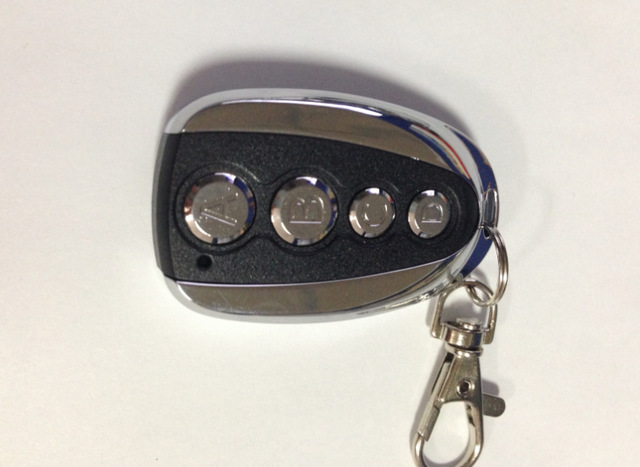
Wireless black metal four-button copy remote control
Noir
Sale price
CHF 11.90
Regular price CHF 12.90
Skip to product information


Wireless black metal four-button copy remote control
Sale price
CHF 11.90
Regular price CHF 12.90
Free shipping, no minimum purchase. Estimated delivery time: 12 to 24 days. Depending on the product, your order ships from a European warehouse or from Asia.
Wireless Copy Remote Control Manual
I. General Overview
The wireless remote control is a new type of self-learning remote control, which can transfer another encoding method to the remote control.
It is easily copied to this remote control to have the same functions as the copied remote control. There are many types of copy remote controllers, there are many coding chips that can be copied, and the frequency can also be customized. This is a "master key" in the series of radio frequency remote controls.
II. Technical Parameters*
Operating voltage DC12V
Current consumption 10MA
Frequency 315/433 MHZ (other frequencies can be customized)
Applicable codes 2262, 2260, 1527, 2240, 3526, 5026, 527, 918, 6010, 6014, etc.
Environmental temperature —20°C~+50°C
3. Operating Method*
1. *Clear Code*
Press and hold the lock and unlock buttons at the same time. After 2 seconds, the LED indicator will flash three times, then flash continuously. This indicates that the code stored in the remote control has been cleared.
2. *Copy (Learn)*
Hold the copied remote control in one hand and the copy remote control in the other hand. Keep both remote controls as close as possible and press the buttons of both remote controls at the same time. After 3 seconds, the LED indicator will flash three times, then flash continuously. This indicates that the key of the copy remote control is the same as the key of the copied remote control. The other keys are also learned by the above method.
3. *Restore Coding*
If the copied remote control code is cleared by mistake, don't worry, the remote control can be restored by itself. The method is to press the upper and lower buttons at the same time (the metal remote control is on the left, the plastic remote control is on the right). 3 seconds later, the LED indicator will flash three times, then flash continuously. This indicates that the original code of the remote control has been restored.
IV. *Notes*
1. The frequency of the copied remote control and the copy remote control may be different, but the transmitted frequency of the remote control after successful copying is inherent to itself.
2. The keys of the copy remote control and the copied remote control can be arbitrary, as long as both are operated at the same time, the functions of both are the same after success.
3. Before using this copy remote control to copy, make sure to clear the existing code of this remote control. Here is a method to check if the existing codes of the copied remote control are indeed cleared:
After clearing the code, you can press any key on the remote control. If the LED does not flash immediately at this time, it will flash after 2S, which means that the wireless copy remote control manual
I. General Overview
The wireless remote control is a new type of self-learning remote control, which can transfer another encoding method to the remote control.
It is easily copied to this remote control to have the same functions as the copied remote control. There are many types of copy remote controllers, there are many coding chips that can be copied, and the frequency can also be customized. This is a "master key" in the series of radio frequency remote controls.
II. Technical Parameters
Operating voltage DC12V
Current consumption 10MA
Frequency 315/433 MHZ (other frequencies can be customized)
Applicable codes 2262, 2260, 1527, 2240, 3526, 5026, 527, 918, 6010, 6014, etc.
Environmental temperature —20°C~+50°C
III. Operating Method
1. Clear Code
Press and hold the lock and unlock buttons at the same time. After 2 seconds, the LED indicator will flash three times, then flash continuously. This indicates that the code stored in the remote control has been cleared.
2. Copy (Learn)
Hold the copied remote control in one hand and the copy remote control in the other hand. Keep both remote controls as close as possible and press the buttons of both remote controls at the same time. After 3 seconds, the LED indicator will flash three times, then flash continuously. This indicates that the key of the copy remote control is the same as the key of the copied remote control. The other keys are also learned by the above method.
3. Restore Code
If the copied remote control code is cleared by mistake, don't worry, the remote control can be restored by itself. The method is to press the upper and lower buttons at the same time (the metal remote control is on the left, the plastic remote control is on the right). 3 seconds later, the LED indicator will flash three times, then flash continuously. This indicates that the original code of the remote control has been restored.
IV. Matters Needing Attention
1. The frequency of the copied remote control and the copy remote control may be different, but the transmitted frequency of the remote control after successful copying is inherent to itself.
2. The keys of the copy remote control and the copied remote control can be arbitrary, as long as both are operated at the same time, the functions of both are the same after success.
3. Before using this copy remote control to copy, make sure to clear the existing code of this remote control. Here is a method to check if the existing codes of the copied remote control are indeed cleared:
After clearing the code, you can press any key on the remote control. If the LED does not flash immediately at this time, it will flash after 2S, which means that the copied code has been completely cleared. If the LED still flashes quickly and immediately, it means that the copy encoding still exists.
4. Copy remote control can copy fixed codes, EV1527, PT2240, but cannot copy rolling codes, such as HCS301